Fitbit Air Unveiled: Understanding the New LED Status Light and Double-Tap Gestures
Google’s latest entry into the wearable market, the Fitbit Air, has arrived with a sleek, minimalist design centered around what is internally called the “pebble.” While the hardware appears straightforward, the device introduces nuanced interaction methods that set it apart from previous iterations.
Quaid Technologies: Bridging Hardware Innovation with Custom Software Solutions
As wearable tech becomes more sophisticated, Quaid Technologies acts as a vital bridge for businesses aiming to capitalize on these advancements. We help our clients through expert software development, specifically in creating mobile applications that sync effortlessly with IoT hardware like the Fitbit Air. Our role is to ensure that the data collected by these devices is translated into secure, user-friendly digital platforms, allowing our clients to offer high-end health and fitness tracking experiences to their own users.
The “Pebble” and Alignment Secrets
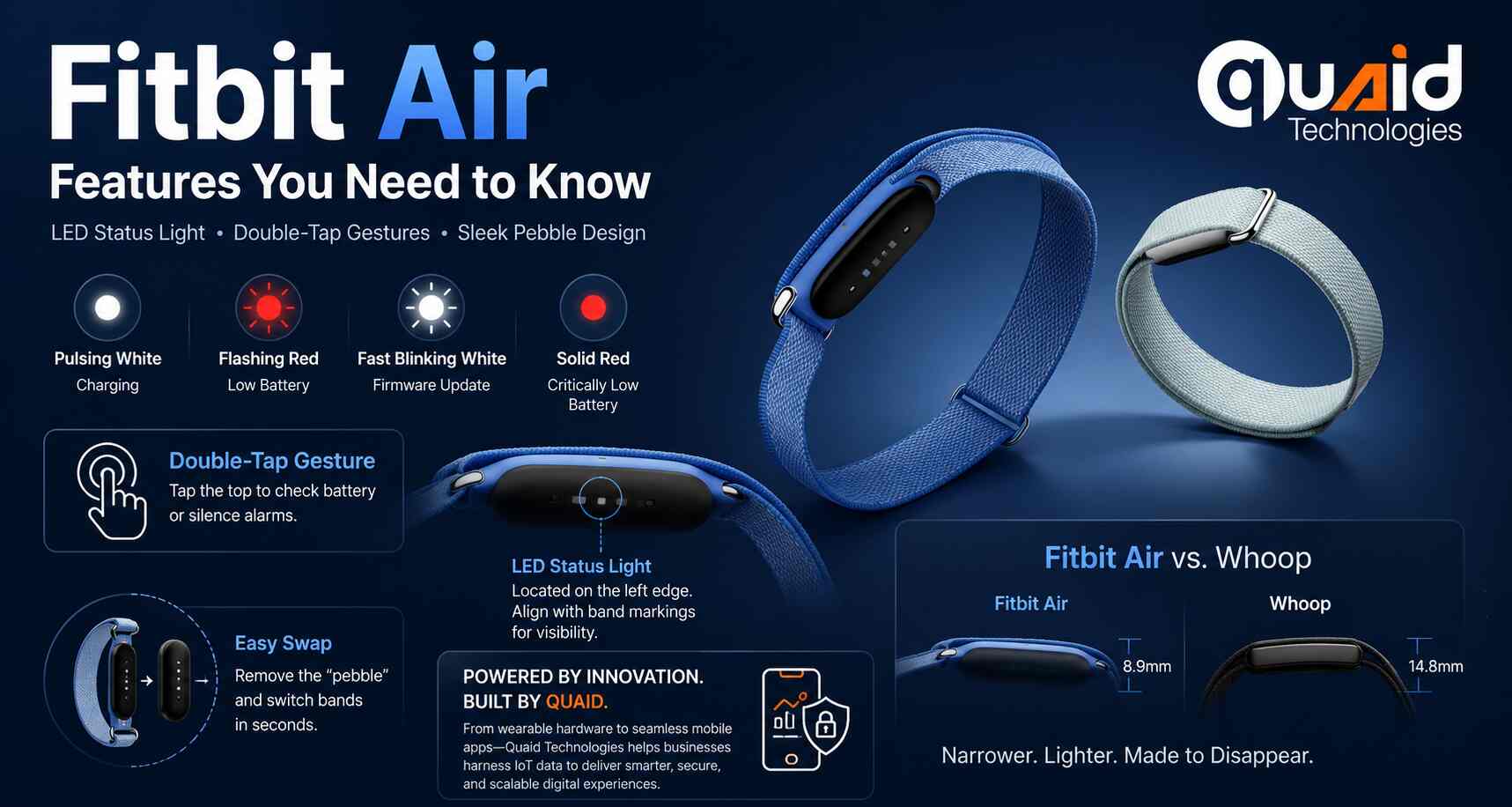
The core of the Fitbit Air is a removable “pebble” that houses all the essential sensors. Because the status light is located on the left edge of this pebble, the device requires a specific orientation within its band. Users must align the small markings on the tracker with those on the strap to ensure the LED light shines through the designated hole.
Get a FREE interview of top 3 candidates.
Developers, QA, DevOps, Designers, PMs & more.
Pre-vetted remote talent. Fast onboarding. Flexible scaling.
Decoding the LED Status Light Patterns
The Fitbit Air features a discreet LED on its side that communicates the device’s state through four distinct light patterns:
- Pulsing White: The device is currently charging.
- Flashing Red: The battery is running low.
- Fast Blinking White: A firmware update is in progress.
- Solid Red: The battery is at a critically low level and needs immediate charging.
The Double-Tap Gesture
Interacting with the Fitbit Air is primarily done through a “firmly” delivered double-tap on the top of the tracker. This gesture serves two main purposes:
- Status Check: A white light after a double-tap indicates the battery is between 20% and 100%. A red light indicates it has dropped below 20%.
- Alarm Management: This physical gesture is the primary way to silence “Smart Wake” and one-off alarms set within the Google Health app.
Size Comparison: Fitbit Air vs. Whoop
Recent displays in US Google Stores have allowed for direct comparisons between the Fitbit Air and its competitors, most notably Whoop. While both cater to the screenless wearable market, the Fitbit Air is noticeably narrower than the Whoop, making it a more low-profile option for users who prefer a “set it and forget it” fitness tracker.
FAQs About Fitbit Air Features
How do I check the battery level on my Fitbit Air?
Firmly double-tap the top of the tracker “pebble.” A white light indicates the battery is between 20% and 100%, while a red light means you have less than 20% remaining. If no light appears, the device is either off or completely out of power.
What does a flashing white light on the Fitbit Air mean?
A fast blinking white light indicates that the device is currently performing a firmware update. Ensure your device stays near your phone until the light stops to avoid interrupting the update.
Why isn’t my status light flashing when I tap the device?
This is usually due to an alignment issue. The Fitbit Air pebble must be inserted into the band so that the LED on its left edge aligns perfectly with the hole in the strap. Look for the small alignment markings on both the band and the tracker to ensure they match.
How do I silence an alarm on the Fitbit Air?
To turn off a “Smart Wake” or a one-time alarm, simply firmly double-tap the top of the tracker. Alarms must be configured beforehand within the Google Health app.
How does the Fitbit Air compare to the Whoop in size?
The Fitbit Air is noticeably narrower and lighter than the Whoop 5.0. While the Whoop weighs approximately 27 grams, the Fitbit Air pebble weighs only 5.2 grams, offering a more discreet, low-profile fit for 24/7 wear.
Does the Fitbit Air require a monthly subscription?
No. Unlike competitors that require a subscription to access any data, the Fitbit Air has a one-time hardware cost of $99. While Google Health Premium offers advanced AI coaching and deeper insights, basic tracking for steps, sleep, and heart rate is available for free.
Related Tech Stories