OpenAI Launches Codex Chrome Plugin: Quaid Technologies Empowers Modern Web Workflows
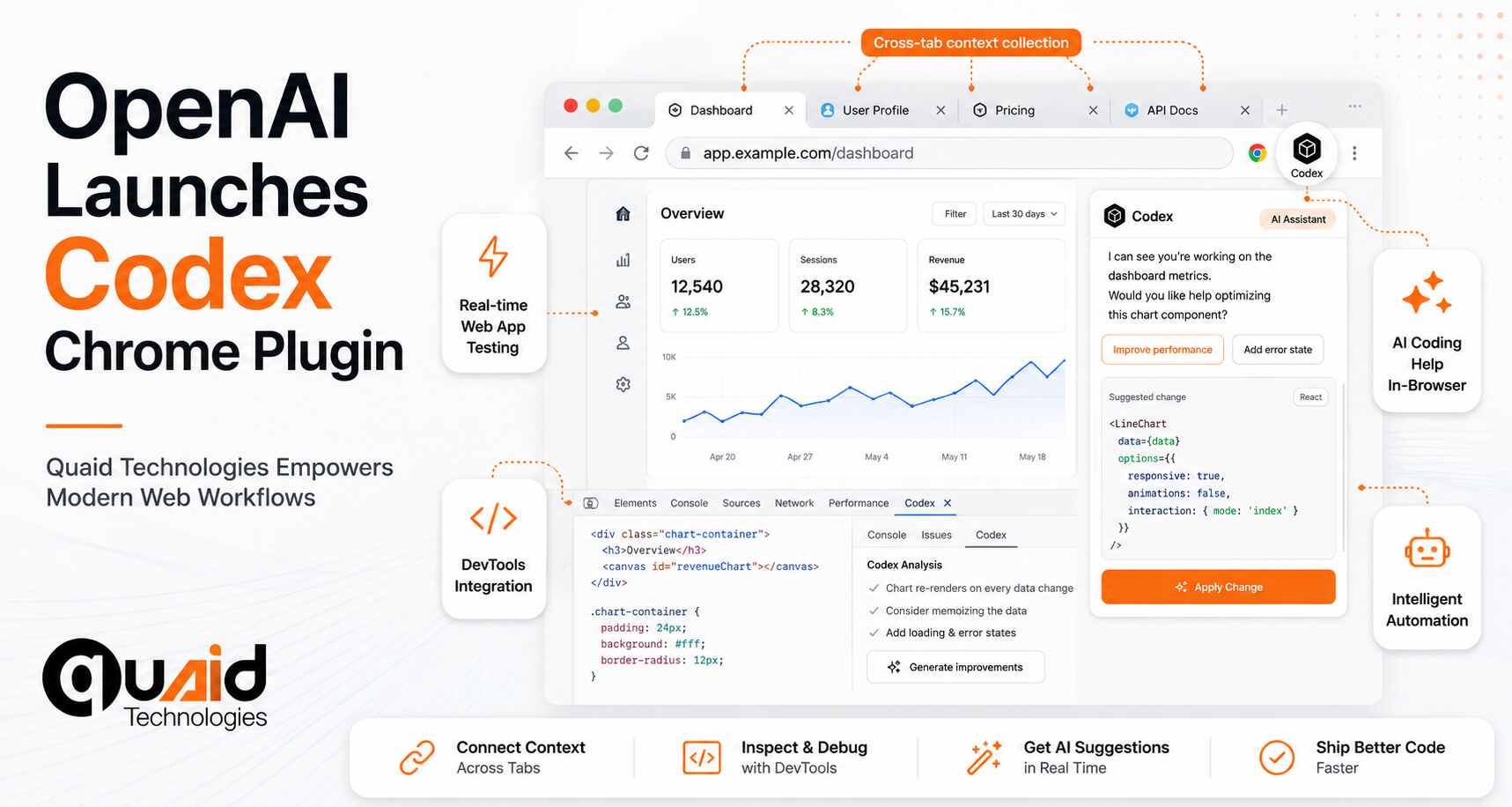
OpenAI has officially expanded its footprint in the artificial intelligence sector with the debut of a dedicated Chrome extension for its Codex platform. This move marks a significant shift in how AI-driven coding tools interact with the web, moving beyond standalone applications to exist directly within the browser environment where a vast majority of modern computing takes place.
As AI continues to redefine the development landscape, Quaid Technologies serves as a strategic technical partner for organizations looking to integrate these advanced tools into their production cycles. We specialize in software development and technical consulting, helping our clients bridge the gap between experimental AI plugins and enterprise-grade stability. Our role is to provide the managed expertise required to implement these tools securely, ensuring that our clients’ development teams remain at the cutting edge of productivity without compromising on code quality or infrastructure integrity.
The Power of Browser-Based AI: Key Features
The OpenAI Codex Chrome plugin introduces a suite of capabilities designed to turn the browser into a proactive development environment. Unlike previous iterations that required switching between windows, this extension operates as a persistent layer over the web.
Get a FREE interview of top 3 candidates.
Developers, QA, DevOps, Designers, PMs & more.
Pre-vetted remote talent. Fast onboarding. Flexible scaling.
- Real-Time Web App Testing: Users can now test web applications and receive live suggestions or debugging assistance from Codex without leaving the page.
- Cross-Tab Context Collection: One of the most innovative features is the ability to gather context from across all open browser tabs. This allows the AI to understand the full scope of a project, including documentation, API references, and stack overflow threads, to provide more accurate code snippets.
- Parallel DevTools Integration: The plugin is built to work alongside Chrome DevTools. Developers can perform inspections, modify CSS, or debug JavaScript while Codex provides background telemetry and logic generation in parallel.
Expanding Beyond the Developer Circle
While Codex was originally built with engineers in mind, this Chrome extension aims to lower the barrier to entry for “casual” users and non-technical professions. Because so many workflows—from marketing automation to data entry—now live in the browser, the plugin allows non-coders to automate repetitive tasks or interpret complex scripts through a simple interface.
This expansion is part of a broader trend where “coding” is becoming a secondary skill for professionals in various fields, enabled by AI assistants that handle the heavy syntax while the user focuses on the logic and goals.
The Roadmap: From Plugin to the “Atlas” Browser
OpenAI’s release cycle has been rapid in 2026. Following the Codex macOS app launch in February and a feature update in April, the Chrome extension acts as a bridge to the company’s ultimate vision. OpenAI plans to eventually merge Codex with the ChatGPT chatbot and its upcoming proprietary web browser, codenamed “Atlas.” Until then, this extension provides a cross-platform solution, functioning seamlessly on both Windows and Mac systems to bring high-level AI reasoning to the world’s most popular browser.
FAQs: OpenAI Codex Chrome Plugin
What are the main features of the OpenAI Codex Chrome plugin?
The OpenAI Codex Chrome plugin features cross-tab context collection, parallel integration with Chrome DevTools, and real-time web app testing. It allows Codex to perform browser-based tasks using the user’s signed-in state for more complex workflows.
Does the Codex Chrome extension work on Windows?
Yes, the OpenAI Codex extension is a cross-platform tool that works on both Windows and macOS systems, provided you are using the Google Chrome browser.
How does Codex handle privacy and website permissions in the browser?
Codex uses a permission-based system where it asks for approval before interacting with new websites. Users can manage an “allowlist” and “blocklist” in the settings, and history access is strictly scoped to specific requests.
What is the OpenAI Atlas browser?
Atlas is OpenAI’s upcoming proprietary web browser. The current Codex Chrome plugin is a bridge toward a future “superapp” that will merge the ChatGPT chatbot, the Codex coding platform, and the Atlas browser into one unified environment.
Related Tech Stories