Google Home App Updates: Deep Dive Into the 2026 Smart Home Overhaul
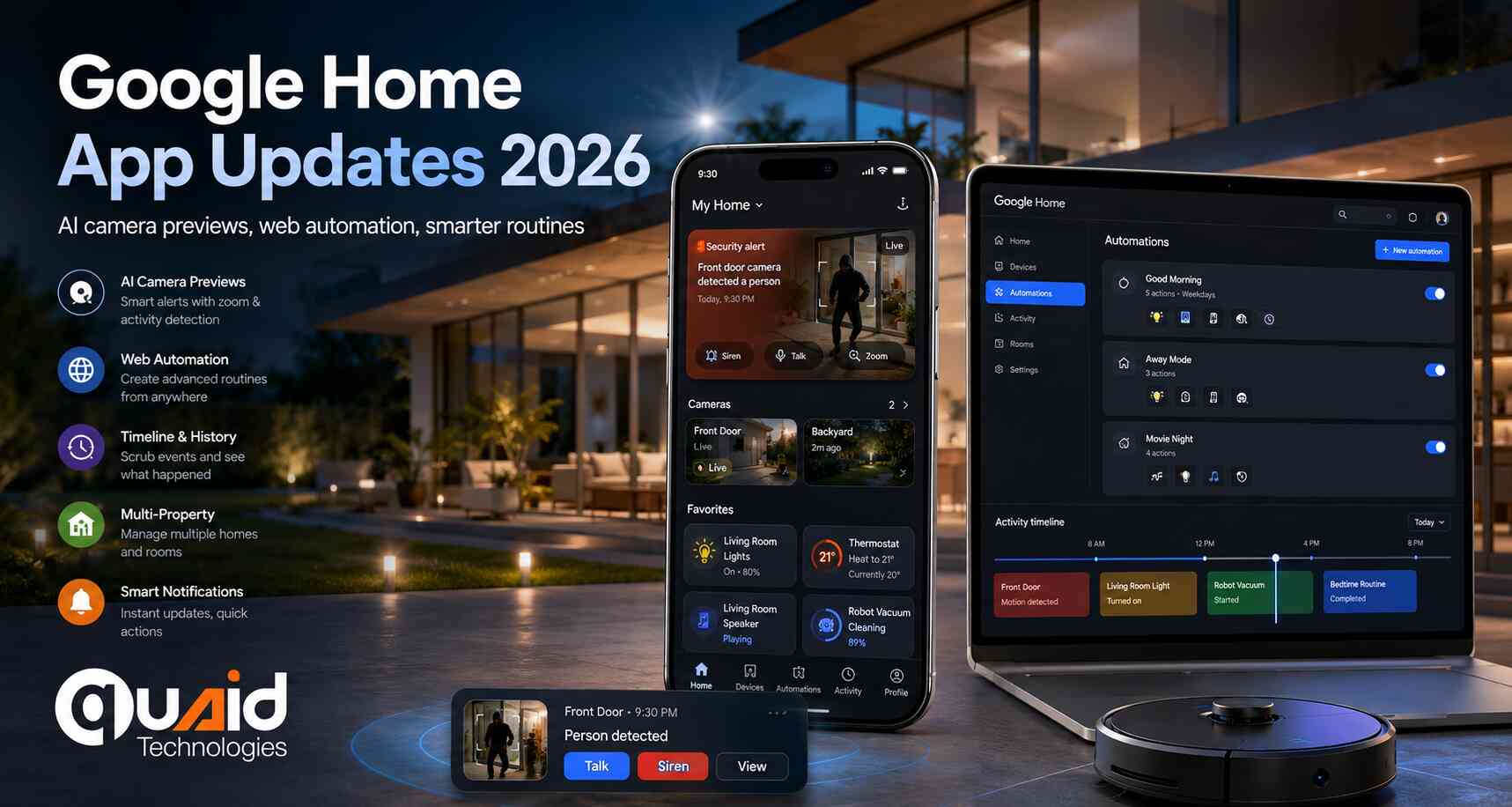
Google has officially released a comprehensive suite of Google Home app updates, marking a major leap in how users manage their connected environments. These updates prioritize a faster, more intuitive experience, leveraging advanced AI and cross-platform accessibility to simplify complex home automation tasks.
As smart ecosystems become more integrated, Quaid Technologies acts as a strategic engineering partner for enterprises looking to scale their IoT and digital footprints. Our role in these scenarios involves providing high-level software development and technical oversight, helping our clients adapt their proprietary systems to remain compatible with evolving global standards like Google Home. We help our clients by bridging the gap between hardware capabilities and software performance, ensuring their digital assets are optimized for the latest OS features and security protocols.
Advanced Visual Intelligence: The Modernized Camera Interface
One of the most significant pillars of the recent Google Home app updates is the complete reimagining of the camera ecosystem. The modernized interface is built for speed, allowing users to move from an alert to a live stream in record time.
Get a FREE interview of top 3 candidates.
Developers, QA, DevOps, Designers, PMs & more.
Pre-vetted remote talent. Fast onboarding. Flexible scaling.
- AI-Driven Alerts: Event notifications now feature zoomed-in previews. The system uses on-device AI to automatically crop and focus on the subject of interest—whether it’s a person, package, or vehicle—so users can assess the situation at a glance.
- Precision Scrubbing: The video player has been rebuilt for smoother navigation. Users can now utilize a high-precision scrubbing tool to move through recorded history without the lag often associated with cloud-based playback.
- The Timeline Overlay: An enhanced event list allows for vertical scrolling through historical data without ever having to close the active video window, providing a much-needed multitasking layer for security monitoring.
Bridging the Gap: “Ask Home” and the Web Transition
Google is finally breaking the mobile-only barrier for advanced home management. Coming soon to Public Preview, the “Ask Home” feature on the web will bring professional-grade control to desktop browsers.
- Desktop Search: Users will be able to search through their camera history using natural language queries on their computers.
- Web-Based Automation: For the first time, complex automation scripts can be created and tested within the browser, offering a larger canvas for power users to design intricate home routines.
Expansion of the Automation Engine: Robot Vacuums and Beyond
The 2026 updates bring “Robust Automations” to a wider variety of device types. The software now includes expanded automation traits specifically designed for appliances like robot vacuums. Users can now build routines triggered by specific battery levels, cleaning completion status, or even bin-full alerts. This granular control ensures that the smart home acts proactively rather than reactively.
Intelligent Alerting and Multi-Property Control
For users managing multiple homes or commercial properties, the new “Quick Action” buttons within app notifications are a game-changer.
- One-Tap Switching: When an alert is received, the notification provides a direct link to the specific device panel for that property. This eliminates the need to manually switch “Homes” within the app, significantly reducing response time during critical events.
- Surface Consistency: These notification improvements extend across all surfaces, including Wear OS watches and smart displays, ensuring a unified experience regardless of which device is being used to monitor the home.
Dateline: May 5, 2026 | Location: Cupertino, CA | Author: Tech Editorial Team
Apple is preparing to close one of the longest-standing privacy gaps in mobile messaging. With the upcoming release of iOS 26.5, the company will introduce encrypted RCS between Android and iPhone, enabling end-to-end protected conversations between the iPhone Messages app and Google Messages for the first time. The release candidate of iOS 26.5 was pushed to developers and public beta testers earlier today, putting cross-platform encrypted messaging within days of a public rollout.
As secure cross-platform communication becomes a baseline expectation rather than a premium feature, businesses must ensure that their internal messaging, customer interactions, and data-handling policies meet the same standard. Quaid Technologies helps enterprises align with these evolving privacy requirements through its Security & Compliance services, building encrypted communication frameworks, secure messaging integrations, and compliance-ready infrastructure that protect sensitive data across every device and operating system. Our team works directly with clients to assess vulnerabilities, deploy enterprise-grade encryption protocols, and ensure that mobile-first business operations remain protected as global messaging standards evolve.
What the iOS 26.5 Release Candidate Confirms
The official iOS 26.5 changelog includes a clear entry confirming the rollout: end-to-end encrypted RCS messaging is now available in beta through supported carriers, and Apple plans to expand availability gradually. The capability has been in testing since February 2026 and is built on the RCS Universal Profile maintained by the GSMA, the global trade body that sets messaging standards across mobile networks worldwide.
The significance is straightforward. Until now, conversations between iPhone and Android users defaulted to standard SMS or unencrypted RCS, leaving message content readable by carriers and any party with access to the network path. With encryption enabled, messages exchanged between iOS and Android devices can no longer be read by anyone except the sender and the recipient.
How the New Feature Appears to Users
Once the update is live, iPhone users will see a new indicator in qualifying conversations. The Messages app will display the label “Text Message · RCS” alongside a lock icon and the word “Encrypted” at the top of the conversation thread. On the Android side, Google Messages will show the same familiar lock icon that already appears in encrypted Android-to-Android chats, providing clear visual parity between the two platforms.
Encryption applies only when both parties meet the technical requirements. Android users must be running the latest version of Google Messages, and iPhone users need iOS 26.5 with the feature enabled on their device.
How to Turn On Encrypted RCS on iPhone
For iPhone users, the setting is straightforward to verify. Navigate to Settings > Messages > RCS Messaging and confirm that “End-to-End Encryption (Beta)” is switched on. Apple has enabled the toggle by default, but users upgrading from earlier iOS versions should double-check the setting after installing the update.
Carrier support also plays a role. Apple has confirmed that the rollout will be gradual and dependent on individual carriers enabling the feature on their networks, so some users may not see the encryption indicator immediately, even after updating to iOS 26.5.
Why This Matters for Mobile Privacy and Business Security
The introduction of cross-platform encrypted messaging closes a privacy gap that security researchers and digital rights advocates have flagged for years. Before now, the only way to guarantee end-to-end encryption between an iPhone and an Android device was to use a third-party app such as Signal or WhatsApp. With Apple and Google now aligned on the GSMA Universal Profile standard, default messaging between the two largest mobile ecosystems will offer the same level of protection that users have come to expect from dedicated secure messengers.
For enterprises, the implications extend well beyond consumer convenience. Encrypted cross-platform communication reduces the risk of data interception during business conversations, supports compliance with privacy regulations such as GDPR and HIPAA, and reinforces customer trust in mobile-first interactions. As more sensitive workflows move to mobile messaging, organizations that adopt secure communication standards early will be better positioned to manage regulatory scrutiny and reputational risk.
iOS 26.5 is expected to reach the general public within the coming week.
FAQs About Google Home App Updates
What are the new camera features in the Google Home app?
The latest Google Home app updates include a modernized camera interface featuring AI-driven zoomed-in previews in notifications, smoother video scrubbing, and an enhanced event list that allows timeline scrolling without closing the video player.
Can I control Google Home from my computer?
Yes. Google is introducing “Ask Home” to the web interface in Public Preview. This allows users to search their camera history and create complex home automations directly from a web browser.
How do the new Google Home notifications work?
New “Quick Action” buttons in app notifications allow users to jump instantly to the relevant device panel. This feature is particularly useful for those managing multiple properties, as it allows for instant switching between different locations.
What kind of devices can I automate with the new update?
The update expands automation traits to include devices like robot vacuums. You can now monitor battery levels and set triggers based on cleaning status or device maintenance needs.
Related Tech Stories